February 2024 Release Notes
Feb 12 - 14, 2024
Feb 26 - 29, 2024
2024.2
No downtime is required for the release.
New Staging Release dates posted on February 8th.
Because we are publishing these release notes at the start of our internal QA, there may be changes or modifications to the release candidate, which affects these notes. Should that occur, we will highlight any updates in this section
Customers & Audiences
Composer User Interface Enhancements
In the January release, the Composer team released a variety of enhancements that improved how audiences and exports are refreshed. One of the most notable changes was that Composer triggers the refresh of audiences and exports shortly after receiving a signal from the data cloud that indicates data hydration has successfully finished.
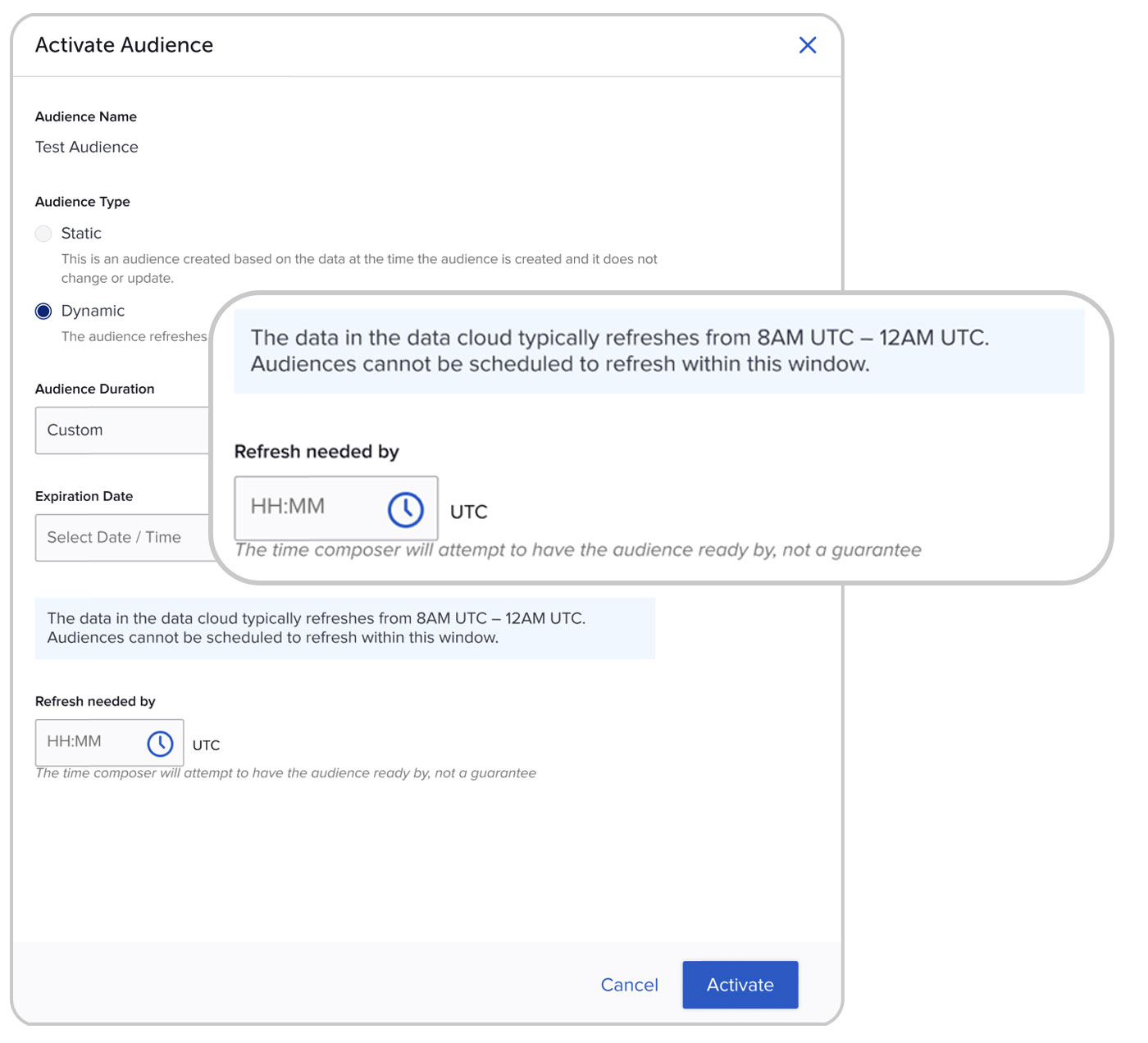
To provide you with more awareness into the timing of data cloud hydration and Composer refreshes, we have added the below to audiences, audience exports, and query exports:
- Refresh Needed By Time
Currently, Composer prioritizes the processing of audiences and exports by ranking their refresh time. The refresh time is automatically set when a user activates an audience or export. Moving forward, you will be able to easily set this time in the user interface to prioritize specific audiences or exports. For example, all audiences will process shortly after the successful hydration signal but an audience with a Needed By Time of 8AM will refresh before an audience with a Needed By Time of 10AM. - Average Hydration Window
Composer will display the average data cloud hydration window for each client. It will help inform you when you can expect your data to be updated and Composer audiences and exports to begin processing. This data will also be used as a validation in the above Needed By Time. For example, if the data cloud typically refreshes from 4AM to 6AM, you will be unable to select a Needed By Time between that window.
Campaigns & Content
Added Functionality for Message Templates
The Campaigns module has supported templates for targeting and behaviors but not for messages. We have added message template functionality which allows for efficient creation of messages and moves us closer to Campaign templates. This feature includes two main functionalities:
Save a message as a template
To save a template, input the message information and click “Save as Template.” You will then be prompted to enter a template name and description and then click “Save.” Dates (e.g. Delivery Date/Time) will not be saved in the message templates. You must enter in dates manually after creating a message from a template. All other aspects of the message (behavior, targeting, creative, etc.) will be saved and automatically applied with the template.
Create a message from a template
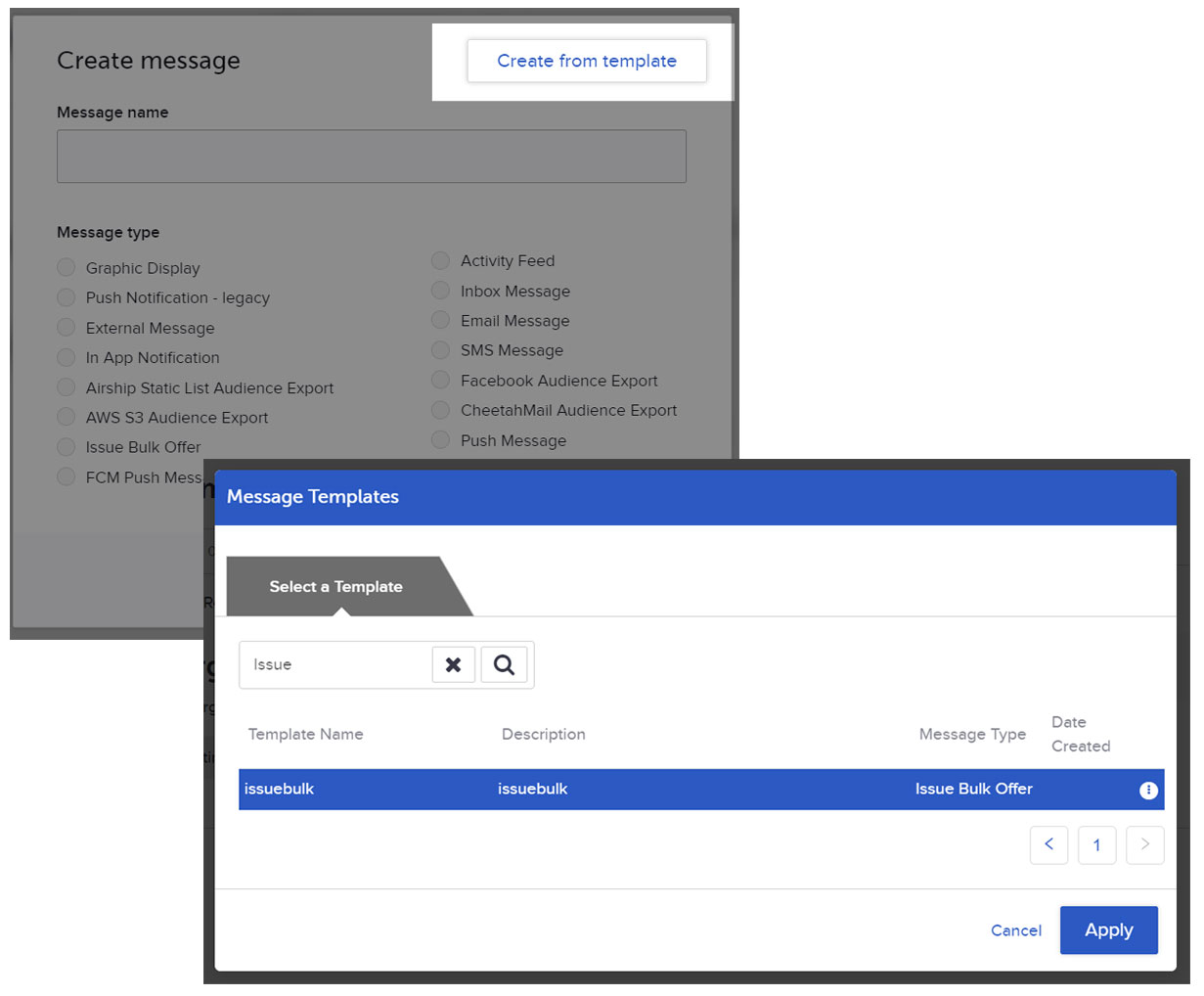
To create a new message from a template, navigate to the message creation modal and click “Create from template” in the upper right. You will then be prompted with a selection modal which includes the message type to make the message selection process easier. Click “Apply” and make sure to fill out any dates and review the remaining information generated from the template. You will only be able to apply a template from the message creation modal. After a message type is selected (e.g. existing message), you won't be able to apply a template.
Improvements:
- Campaigns: Updated column headers in the Campaigns tab of the Customers module to better reflect the data shown
- Messages: Improved the consistency of the user interface across message types that allow adding of event tags. Event tags will only appear as an option if a user checks the “Refine Tag Parameters” box.
Bug Fixes:
- Previously, the campaigns module incorrectly displayed “Offer Start Date” and “Offer End Date” text in the “Active” and “Completed” tabs. This fix has corrected the text to show “Campaign Start Date” and “Campaign End Date” in the campaigns module instead.
- The SMSync Settings toggle on the Admin & Rights page to choose the correct API key to display templates wasn't working, resulting in the client being unable to see the templates. Now, the toggle works as intended and clients are able to successfully view the templates.
Reporting & Analytics
Improvements
- Insights:
- Added new versions of the Tracker visual in the Offers tab to allow grouping by Offer ID, Root Offer ID, or both. You can select which type of grouping better suits your offers setup and reporting needs.
- Added currency-awareness to Insights dashboards for leaf-level organizations. Visuals now provide indication of which currency the monetary values are reported.
- Redesigned all Insights dashboards to improve usability and provide a cohesive data story through a new grouping and positioning of visuals. You can now navigate through thematic topics and new breakdowns of data, with enhanced filtering.
Platform Wide
Organization Management Improvements
Organization Management now supports up to 5 levels of categorization and fifty total Organizations (Orgs) in a SessionM instance. Design your hierarchy to reflect your organization’s or program's relational structure and use the enhanced Org selector to switch between Orgs in the SessionM user interface.
In addition, we're adding support for Customer profiles belonging to multiple Orgs. For clients leveraging Organization Management to run multiple, independent programs, a customer can now be a member in more than one at a time, if desired.
With these enhancements, we’re also adding new tables to Data Cloud, which contain your Org hierarchy and the mappings of program configurations to their respective Orgs. Upon request to your customer success representative, these tables can be added to your daily data extracts. Insights will also natively support bottom-level Org dashboards, including currency awareness when transactions use different currencies across Orgs.
A new API will now be available to use in integrations like those powering consumer loyalty experiences in a website or mobile app. The Divisions API will fetch the mapping of program configurations to Orgs, so you can filter which data to render in org-specific consumer experiences. Our API documentation will be updated shortly to include this new API.
Other improvements include:
- Customize the interface for your “Org” use case, for example use “Market,” “Brand,” or “Division.”
- New and improved Org selector in the Navigation Header and Campaigns, Audiences, Promo Codes, and Composer modules used for Org assignment.
- Native Multi-org support for Messaging Providers and Messaging Provider selectors in Campaign.
- Org indicators throughout Multi-org modules.
- Bug fixes and small UX improvements.